Open Graph Meta Tags – If you have ever shared a link on Facebook, LinkedIn, or WhatsApp and noticed that it automatically shows a title, image, and description — that is Open Graph at work. But most website owners have no idea what Open Graph is, how it works, or why it matters for SEO and digital marketing. This guide covers everything you need to know.
What is Open Graph?
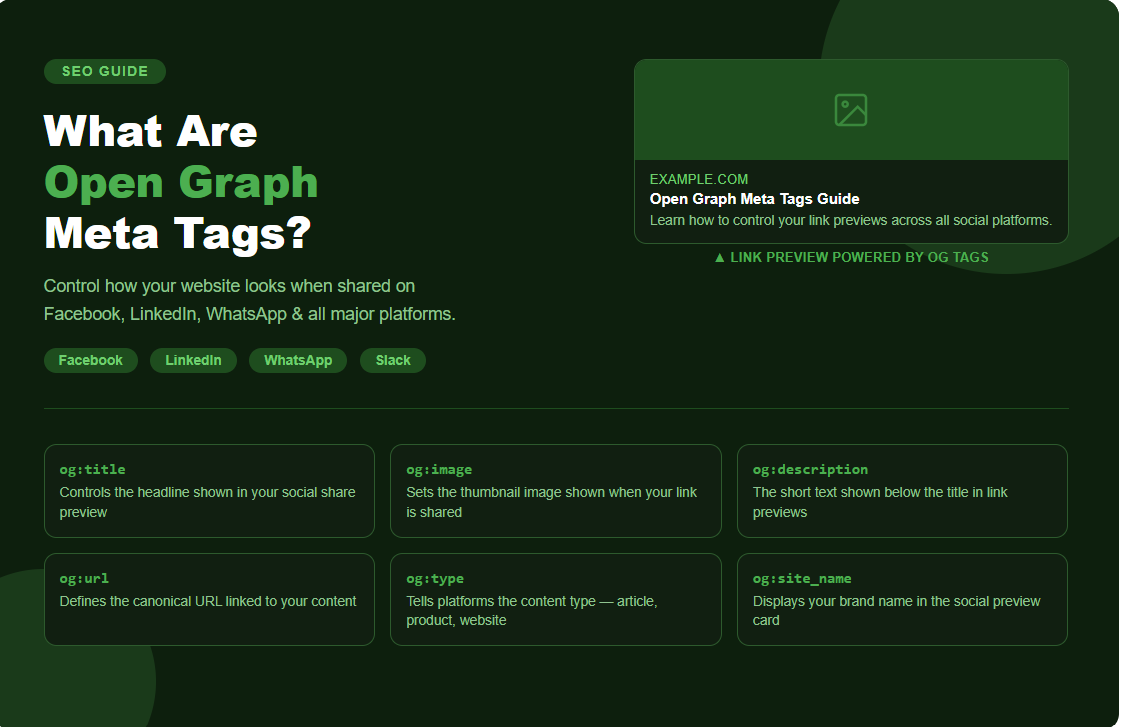
Open Graph is a protocol — a set of rules — introduced by Facebook in 2010 that allows any webpage to become a rich object when shared on social media platforms. It controls how your URL looks when someone shares it on Facebook, LinkedIn, Twitter, WhatsApp, Slack, and many other platforms.
Without Open Graph tags, social platforms will try to guess what your page is about — often pulling the wrong image, a random title, or no description at all. With Open Graph tags, you are in full control of how your content appears every single time it is shared.
What Are Open Graph Meta Tags?
Open Graph meta tags are small pieces of HTML code placed in the <head> section of your webpage. They provide structured information about your page to social platforms and AI tools so they can display it correctly.
A basic Open Graph setup looks like this:
<meta property="og:title" content="What Are Open Graph Meta Tags?" />
<meta property="og:description" content="A complete guide to Open Graph tags and why they matter for SEO." />
<meta property="og:image" content="https://www.example.com/images/open-graph-guide.jpg" />
<meta property="og:url" content="https://www.example.com/open-graph-guide" />
<meta property="og:type" content="website" />
These five tags are the foundation of any Open Graph implementation.
Open Graph Meta Tags Explained One by One
og:title This is the title of your page as it will appear when shared. It does not have to match your HTML title tag exactly — you can write a more engaging, social-friendly version here. Keep it under 60 characters for best results.
og:description This is the short description shown below the title in a social share preview. It should be compelling and summarise the page in 1–2 sentences. Keep it under 160 characters.
og:image This is the most important Open Graph tag. It is the image that appears as the thumbnail when your link is shared. A strong, eye-catching image significantly increases click-through rates on social media. Recommended size is 1200 x 630 pixels.
og:url This specifies the canonical URL of the page — the exact URL that should be associated with the content. This helps avoid duplicate content issues across social platforms.
og:type This tells the platform what type of content your page is. The most common types are website, article, video, product, and music.
Open Graph Types
Open Graph supports several content types. Here are the most commonly used ones:
- website — for standard web pages and homepages
- article — for blog posts, news articles, and editorial content
- product — for e-commerce product pages
- video.movie — for video content and films
- music.song — for music and audio content
- profile — for personal or author profile pages
Choosing the right type helps platforms categorise and display your content more accurately.
Open Graph and SEO — How Are They Connected?
Open Graph tags are not a direct Google ranking factor — Google does not use them to decide where to rank your page. However, Open Graph has a very strong indirect impact on SEO, and here is why:
1. Better Social Sharing Drives More Traffic When your shared links look professional and attractive — with a great image, a clear title, and a compelling description — more people click on them. More clicks mean more traffic. More traffic sends positive signals to Google.
2. Increases Backlinks When your content looks polished when shared, more people engage with it, share it further, and some will link back to it from their own websites. Backlinks are one of the strongest SEO ranking factors.
3. Reduces Bounce Rate When a visitor arrives from social media knowing exactly what to expect — because the preview matched the page — they are more likely to stay and engage. A lower bounce rate is a positive signal for SEO.
4. AI and Structured Data Readability Open Graph tags help AI tools and web crawlers understand your page content quickly and accurately. In the era of AEO and AI Visibility, having clean structured metadata makes your content more likely to be cited by AI engines like ChatGPT and Gemini.
5. Controls Brand Appearance Without Open Graph tags, social platforms pull random images and text from your page. This can look unprofessional and damage your brand credibility. Proper Open Graph setup ensures consistent, branded appearances across all platforms.
Open Graph Protocol — How It Works
The Open Graph protocol is built on RDFa — a method of embedding structured metadata into HTML. When a social platform, messaging app, or AI crawler visits your URL, it reads the Open Graph tags in the <head> of your page and uses that data to generate a preview card.
This is why when you paste a link into LinkedIn or WhatsApp, a rich preview automatically appears — with a title, image, and description — all pulled from your Open Graph tags.
Open Graph for Different Platforms
Facebook — Uses og:title, og:description, og:image, og:url, and og:type to generate link previews in posts and ads.
LinkedIn — Reads Open Graph tags to generate article and post preview cards. LinkedIn is especially important for B2B brands.
Twitter / X — Uses its own version called Twitter Cards, but also falls back to Open Graph tags if Twitter Card tags are missing.
WhatsApp — Reads og:title, og:description, and og:image to generate link previews in chats.
Slack — Uses Open Graph data to unfurl link previews in channels.
Discord — Reads Open Graph tags to display rich embeds when links are shared in servers.
Open Graph App and Testing Tools
Before publishing, always test your Open Graph tags using these free tools:
- Facebook Sharing Debugger —
developers.facebook.com/tools/debug - LinkedIn Post Inspector —
linkedin.com/post-inspector - Twitter Card Validator —
cards-dev.twitter.com/validator - Open Graph Check —
opengraph.xyz
These tools show you exactly how your page will look when shared — and flag any missing or incorrect tags.
Common Open Graph Mistakes to Avoid
- Missing og:image — The most common mistake. Without an image, your shared link looks blank and gets ignored
- Wrong image size — Images smaller than 600 x 315 pixels may not display correctly
- Too long og:title or og:description — Gets cut off in previews
- Not updating after page changes — Old cached previews may show outdated info — use the Facebook Debugger to force a refresh
- Same og:image on every page — Every page should have a unique, relevant image
How to Add Open Graph Tags to Your Website
WordPress — Install the Yoast SEO or Rank Math plugin. Both automatically generate Open Graph tags from your SEO settings.
Custom websites — Add the tags manually inside the <head> section of each page’s HTML.
Shopify — Open Graph tags are built into most themes by default, but can be customised in the theme code.
Final Thoughts
Open Graph meta tags are one of the simplest yet most impactful improvements you can make to your website. They cost nothing to implement, take minutes to set up, and immediately improve how your content looks across every social platform and messaging app.
In a world where first impressions happen in a split second — a well-crafted Open Graph preview can be the difference between someone clicking your link or scrolling past it.
If your website is missing Open Graph tags right now, you are leaving traffic, clicks, and credibility on the table every single day.